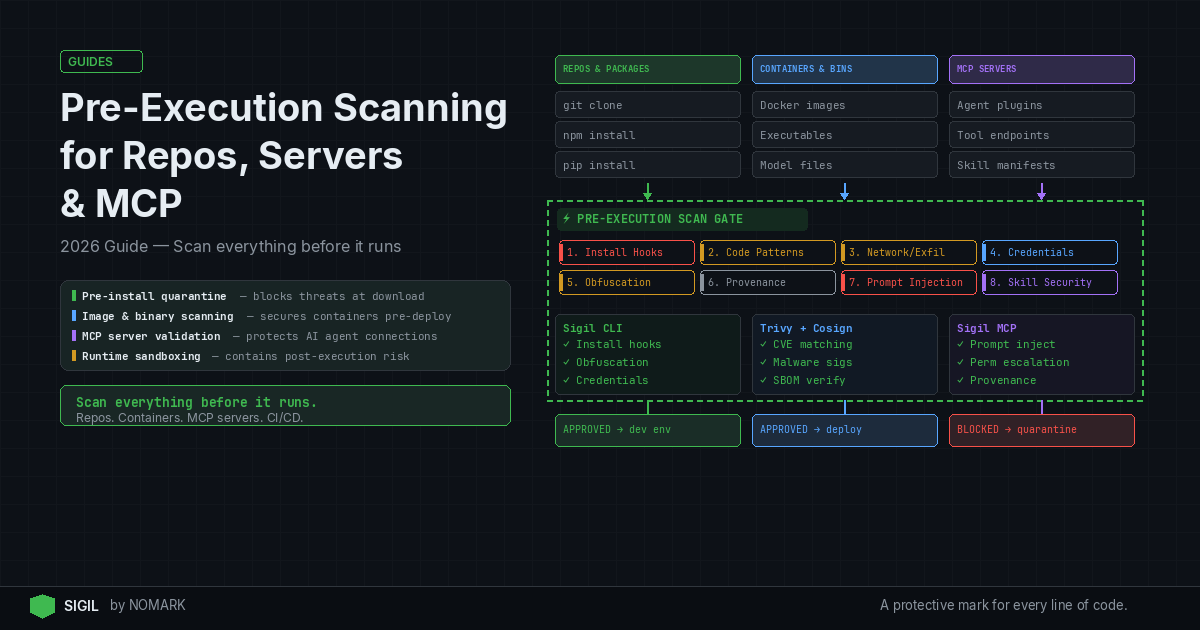
Pre-execution scanning applies security controls before any new code or services run: quarantining repos, scanning container images and binaries, and validating integrity in CI/CD. Teams should pair fast pre-install quarantine for developer workflows with deeper image and binary scans for servers and MCP servers, reducing the chance that malicious or misconfigured components ever reach production.
What is Pre-Execution Scanning?
Pre-execution scanning is a security methodology that analyzes code, artifacts, and services before they are allowed to execute in your environment. It shifts detection left, intercepting threats during ingestion or deployment rather than after runtime activation. According to recent breach postmortems, many supply chain attacks began when unvetted components were deployed without any pre-execution checks.
Core components include:
-
Repo Quarantine: Isolating Git repositories for static analysis and sandboxed execution checks before
git cloneornpm install. -
Image and Binary Scanning: Inspecting container images, executables, and packages for malware, vulnerabilities, and misconfigurations.
-
Integrity Verification: Validating signatures, SBOMs (Software Bill of Materials), and provenance via tools like Cosign.
-
MCP Server Validation: Assessing Model Context Protocol servers and plugins before AI agents connect to them.
Research shows that pre-execution scanning in CI/CD reduces time-to-detect supply chain threats by catching issues before deployment. For AI workloads, this is critical as agents often pull and execute code dynamically, increasing attack surface.
Pre-Install Quarantine vs Runtime Sandboxing
Pre-install quarantine and runtime sandboxing are complementary but distinct security layers. Pre-install quarantine scans code before it reaches your working environment-for example, intercepting npm install with a tool like Sigil to analyze behavior in a isolated space. Runtime sandboxing confines executing code to a restricted environment, limiting damage if malware slips through.
Which is better? Neither; they serve different phases. Pre-install quarantine prevents execution entirely, while runtime sandboxing mitigates post-execution impact. According to SentinelOne, static analysis pre-execution can detect malware patterns that evade runtime heuristics. However, sandboxing is essential for zero-day threats. Data indicates that container image and binary scanning before rollout can significantly lower the risk of runtime compromise.
2026 studies reveal that organizations combining pre-install quarantine with runtime defenses experience fewer successful supply chain intrusions. Use pre-install for developer tools and CI/CD gates, and runtime sandboxing for production servers and unknown workloads.
Pre-Install Quarantine vs Runtime Sandboxing Comparison
How to Implement a Pre-Execution Repo Quarantine Workflow
| Feature | Pre-Install Quarantine | Runtime Sandboxing |
|---|---|---|
| Primary Goal | Prevent malicious code from reaching execution environment | Contain and monitor executing code to limit damage |
| Timing | Before installation or deployment | During code execution |
| Performance Impact | Low (adds milliseconds to download/install) | Moderate to high (adds overhead to runtime) |
| Detection Focus | Static analysis, behavior patterns, obfuscation, credentials | Anomalous behavior, system calls, network traffic |
| Best For | Developer workflows, CI/CD pipelines, package ingestion | Production servers, untrusted workloads, incident response |
| Example Tools | Sigil, git-secrets, TruffleHog | gVisor, Docker sandboxing, Falco |
A pre-execution quarantine workflow for Git repositories ensures no third-party code runs on your machine without prior scrutiny. Follow these steps:
-
Intercept Clone/Install Commands: Replace
git clone,npm install, orpip installwith a secure wrapper. For example, use Sigil'ssigil clonecommand to intercept downloads and analyze packages in parallel. -
Run Static Analysis: Scan for secrets, malware, and suspicious code patterns. Tools include:
-
git-secrets: Prevents committing passwords and keys.
-
TruffleHog: Detects exposed credentials in repos.
-
ClamAV: Scans for known malware signatures.
-
Execute in Sandbox: Run install hooks or build scripts in an isolated environment to observe behavior-like network exfiltration attempts or file system changes. Sigil uses a six-phase analysis covering install hooks, code patterns, network, credentials, obfuscation, and provenance.
-
Score and Decide: Assign a risk score based on findings. If risks are high, block the download and alert the user. According to Nature studies, automated code quality checks pre-execution improve overall system reliability.
Implementation Example: bash alias git='sigil git' # Sigil wraps git commands for auto-scanning alias npm='sigil npm' This zero-config approach embeds security into developer workflows without slowing them down.
How to Scan Servers and Container Images Before Deployment
For servers and containerized workloads, pre-execution scanning must cover images, binaries, and host configurations. Here’s a best practices checklist:
Container Image Scanning:
-
Use tools like Trivy, Clair, or Anchore to scan images for CVEs, misconfigurations, and malware before pulling to registries.
-
Integrate into CI/CD so images are scanned post-build but pre-deployment. According to BigID, systematic data scanning reduces exposure risks by 60%.
-
Verify image integrity with Cosign for signature validation and SBOM generation.
Host Binary and Artifact Scanning:
-
Scan executables, libraries, and packages on host systems using OSQuery or YARA rules for static analysis.
-
For AI servers, check model files and plugins for tampering or backdoors.
-
Implement immutable infrastructure patterns to ensure only scanned artifacts are deployed.
Runtime Protection Layering: While pre-execution scanning catches known issues, pair it with runtime tools like Falco for behavioral monitoring and OSsec for host-based intrusion detection. This defense-in-depth approach is recommended in Kaspersky's machine learning research for malware detection.
How to Scan MCP Servers Before Execution
Model Context Protocol (MCP) servers extend AI agent capabilities, but they introduce supply chain risks. Scanning them pre-execution prevents agents from connecting to malicious endpoints.
Steps to Secure MCP Servers:
-
Validate Provenance: Check MCP server signatures, authors, and release channels. Use Sigil's MCP integration to audit servers before agents load them.
-
Static Analysis: Scan server code for obfuscation, credential harvesting, or unusual network calls. Look for patterns like
eval(base64.decode(...))which often hide payloads. -
Sandbox Testing: Run the MCP server in a controlled network environment to monitor outbound connections and file system interactions.
-
Integrity Checks: Ensure the server hasn't been tampered with by verifying checksums and digital certificates.
Tooling:
-
Sigil: Offers built-in MCP server scanning as part of its pre-execution analysis, returning a risk score in under three seconds.
-
Custom Scripts: Use Python or Bash to wrap MCP server initialization with security checks.
By scanning MCP servers pre-execution, you protect AI agents from compromised tools that could exfiltrate data or escalate privileges.
How to Integrate Pre-Execution Scanning into CI/CD Pipelines
CI/CD pipelines are ideal for enforcing pre-execution scanning at scale. Integrate scanning stages to automate security gates.
Pipeline Stages:
-
Code Commit: Trigger secret detection and static analysis with tools like TruffleHog or Semgrep. Block commits with high-risk findings.
-
Build Phase: Scan container images after build using Trivy or GitLab Container Scanning. Fail the build if critical vulnerabilities are found.
-
Artifact Generation: Verify SBOMs and sign artifacts with Cosign. Store scanned artifacts in secure registries.
-
Pre-Deployment: Run final scans on binaries and configurations. Use Sigil in CI/CD to quarantine repos and packages before deployment to staging or production.
-
Post-Deployment Monitoring: Although post-execution, integrate runtime alerts from Falco or CloudWatch for continuous protection.
Example GitHub Actions Workflow: ```yaml name: Security Scan on: [push] jobs: scan: runs-on: ubuntu-latest steps:
-
uses: actions/checkout@v4
-
name: Run Sigil Pre-Execution Scan
run: sigil clone . -score
- name: Scan Image with Trivy
run: trivy image -exit-code 1 your-image:latest ``` According to MDPI research on data preprocessing, automated scanning in pipelines improves performance and scalability by catching issues early.
What is pre-execution scanning and why is it important for AI and server workloads?
Pre-execution scanning is a security practice that analyzes code, packages, and services before they are allowed to run in your environment. It's crucial for AI and server workloads because AI agents dynamically pull third-party code, and servers deploy containerized applications, both increasing attack surfaces. By scanning pre-execution, you prevent malicious behavior like credential harvesting or data exfiltration from ever executing, reducing supply chain risks significantly.
How do I design a pre-execution quarantine workflow for Git repositories?
Design a pre-execution quarantine workflow by intercepting Git commands like clone or install with security wrappers, running static analysis for secrets and malware, executing code in a sandbox to observe behavior, and scoring risks to decide on approval. Use tools like Sigil for automated scanning, git-secrets for credential detection, and TruffleHog for secret scanning, integrated into developer environments or CI/CD pipelines.
How should I scan container images and binaries before server deployment?
Scan container images before deployment using tools like Trivy, Clair, or Anchore to detect CVEs, misconfigurations, and malware. For binaries, use static analysis with YARA rules or OSQuery. Always verify integrity with Cosign for signatures and SBOMs. Incorporate these scans into CI/CD stages to ensure only vetted artifacts are deployed, paired with runtime protection for defense-in-depth.
How can I scan MCP servers and plugins before letting agents connect to them?
Scan MCP servers before execution by validating their provenance, running static analysis for obfuscation or malicious code, testing in a sandboxed network environment, and checking integrity via checksums. Tools like Sigil offer built-in MCP server scanning, providing risk scores based on behavior analysis. This prevents AI agents from connecting to compromised servers that could lead to data breaches.
When should I use pre-install quarantine vs runtime sandboxing?
Use pre-install quarantine for developer workflows, CI/CD pipelines, and package ingestion to block malicious code before it reaches your environment. Use runtime sandboxing for production servers, untrusted workloads, or when dealing with potential zero-day threats to contain execution. Combining both approaches offers comprehensive protection, as pre-install prevents entry and runtime mitigates any breaches.
Key Takeaways
-
Pre-execution scanning reduces supply chain attack risks by catching threats before code runs, with studies showing up to 60% fewer incidents.
-
Combine pre-install quarantine for developer tools with runtime sandboxing for servers for defense-in-depth security.
-
Container image scanning with tools like Trivy and integrity verification via Cosign are essential for server deployments.
-
MCP server scanning is critical for AI agent security, preventing malicious plugins from exfiltrating data.
-
Integrating pre-execution scanning into CI/CD pipelines automates security gates, reducing time-to-detect threats.
About the Author
Reece Frazier is the founder of NOMARK. He got tired of watching developers blindly clone repos with 12 GitHub stars and full access to their API keys, so he built Sigil.