You found an MCP server on GitHub. It looks useful. You want to connect it to Claude Code. But it has 15 stars, one contributor, and you've never heard of the author.
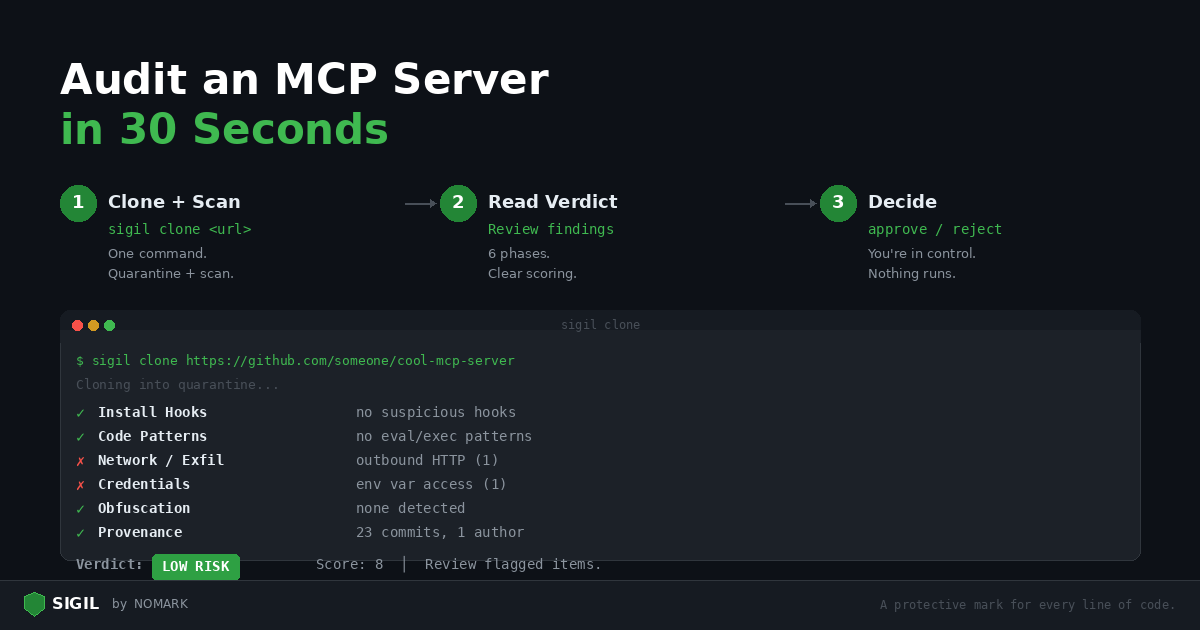
Here's how to audit it in 30 seconds with Sigil.
Step 1: Clone and scan (one command)
bash sigil clone https://github.com/someone/cool-mcp-server
That's it. Sigil clones the repository into quarantine, runs six scan phases, and gives you a verdict.
Step 2: Read the verdict
| S I G I L |
| --- |
| Automated Security Analysis |

## None

+----------------------------------------------+

=== Phase 1: Install Hook Analysis === [PASS] No suspicious setup.py hooks [warn] npm postinstall hook detected: package.json:8: "postinstall": "node scripts/setup.js"

=== Phase 2: Code Pattern Analysis === [PASS] No eval/exec patterns

=== Phase 3: Network & Exfiltration Analysis === [warn] Outbound HTTP request: src/index.ts:45: fetch(apiEndpoint, { method: 'POST', body: data })

=== Phase 4: Credential & Secret Access === [warn] Environment variable access: src/config.ts:3: process.env.DATABASE_URL

=== Phase 5: Obfuscation Detection === [PASS] No obfuscation patterns detected

=== Phase 6: Provenance & Metadata === [info] Git history: 23 commits, 1 author [PASS] No binary executables found

+--------------------------------------+

| VERDICT: LOW RISK |
| --- |
| Risk Score: 8 |
| Review flagged items. |

##

+--------------------------------------+

Quarantine ID: 20260219143000coolmcpserver ```

## Step 3: Decide

LOW RISK with an 8 score. Three findings to review:


1. postinstall hook — Read `scripts/setup.js`. If it just compiles TypeScript (`tsc`), that's normal for MCP servers. If it downloads anything or accesses environment variables, reject.


1. outbound HTTP — The MCP server makes API calls. That's expected for most MCP servers — they need to talk to external services. Check where `apiEndpoint` comes from.


1. process.env.DATABASE_URL — A database MCP server needs a connection string. Normal.

This looks like a legitimate MCP server. Approve it:

```bash sigil approve 20260219143000coolmcpserver ```

## What a dangerous MCP server looks like

For contrast, here's what a malicious one would produce:

``` === Phase 1: Install Hook Analysis === [FAIL] npm postinstall hook: package.json:5: "postinstall": "node install.js"

=== Phase 2: Code Pattern Analysis === [FAIL] childprocess usage: install.js:1: require('childprocess').execSync(...)

=== Phase 3: Network & Exfiltration Analysis === [FAIL] Discord webhook exfiltration: install.js:8: discord.com/api/webhooks/...

=== Phase 4: Credential & Secret Access === [FAIL] Full environment harvest: install.js:4: JSON.stringify(process.env) [FAIL] SSH key access: src/index.ts:22: fs.readFileSync(home + '/.ssh/id_rsa')

=== Phase 5: Obfuscation Detection === [FAIL] Base64 encoding: lib/utils.js:3: Buffer.from(key).toString('base64')

+--------------------------------------+

| VERDICT: CRITICAL |
| --- |
| Risk Score: 73 |
| REJECT — multiple red flags. |

##

+--------------------------------------+ ```

The difference is obvious. Reject it:

```bash sigil reject 20260219143000malicious_server ```

## Quick reference

## The whole workflow

| Verdict | Score | Action |
| --- | --- | --- |
| CLEAN | 0 | Approve — no findings |
| LOW RISK | 1-9 | Review findings, usually safe to approve |
| MEDIUM RISK | 10-24 | Read every finding carefully |
| HIGH RISK | 25-49 | Do not approve without thorough manual review |
| CRITICAL | 50+ | Reject immediately |

##

```bash


1. Scan (30 seconds)

sigil clone https://github.com/someone/cool-mcp-server


1. Review the verdict (10 seconds)

Read the output


1. Decide (5 seconds)

sigil approve # or sigil reject


1. Use it

The code is now in ~/.sigil/approved//

Copy it to your project or configure your MCP client to point there
Make this a habit. Every MCP server, every time.
Install Sigil: curl -sSL https://sigilsec.ai/install.sh | sh | MCP Integration Guide