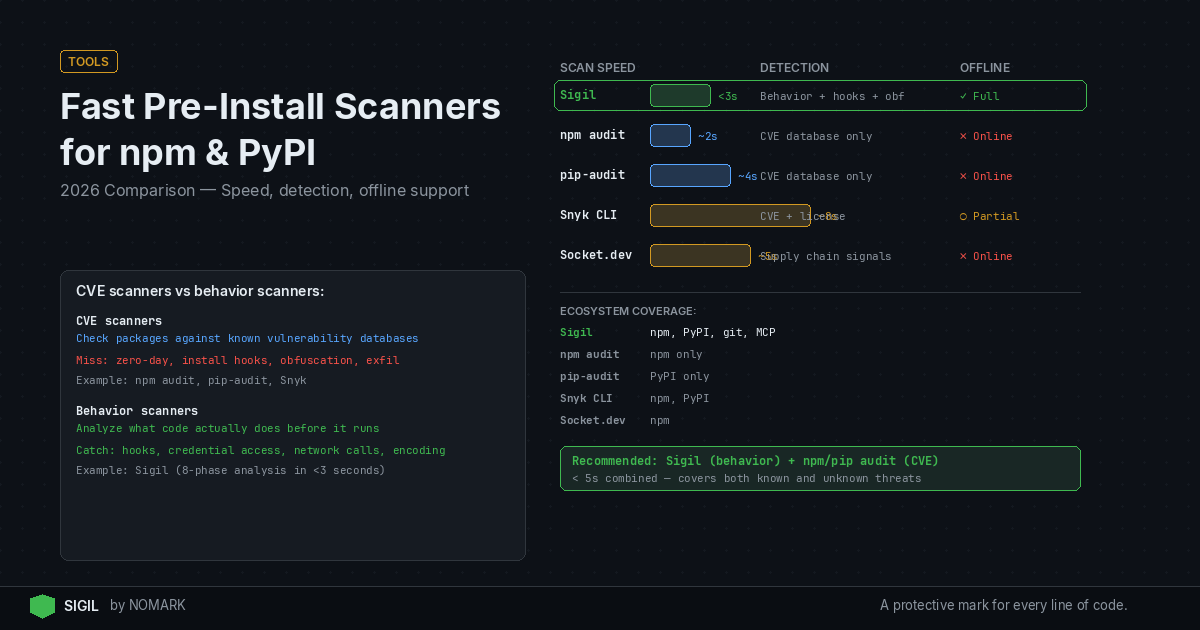
Fast pre-install scanners for npm and PyPI inspect packages before execution, with key differences in detection: CVE databases versus behavior-based analysis. For 2026, tools like npm audit and pip-audit offer basic CVE checks, while Sigil provides three-second, offline behavior scanning for hidden threats. Combine Sigil with CVE scanners for comprehensive pre-install security.
What is Pre-Install Scanning and Why It Matters in 2026?
Pre-install scanning analyzes package contents-like tarballs from npm or PyPI-before they are unpacked or executed on your system. It intercepts downloads (e.g., via sigil clone instead of git clone) to detect malware, vulnerable code, or malicious install hooks that run during installation.
According to recent supply chain security reports, dependency-related attacks now account for a majority of software compromises. In 2026, with AI agents and MCP servers pulling code dynamically, pre-execution checks are critical. Tools that scan after installation miss behavior-based threats like credential harvesting or data exfiltration triggered by install scripts.
Key benefits:
-
Prevents execution of malicious code before it can run.
-
Catches behavior-based threats that CVE scanners overlook.
-
Integrates into developer workflows with CLI tools and CI/CD pipelines.
Which Fast Pre-Install Scanners are Available for npm and PyPI?
For fast pre-install security, developers have several CLI tools that balance speed, detection depth, and workflow integration. The table below compares popular options for npm and PyPI ecosystems in 2026.
Recommendation: For maximum protection, use a behavior-based scanner like Sigil alongside a CVE scanner such as Snyk CLI. This combination covers both known vulnerabilities and novel, obfuscated malware.
Fast Pre-Install Scanner Comparison 2026
How Does npm audit Compare to pip-audit?
| Tool | Ecosystem Support | Detection Type | Speed | Offline Support | Pricing Model |
|---|---|---|---|---|---|
| npm audit | npm only | CVE vulnerabilities | Fast (depends on network) | No (requires internet for DB) | Free |
| yarn/pnpm audit | npm only | CVE vulnerabilities | Fast (similar to npm audit) | No | Free |
| pip-audit | PyPI only | CVE vulnerabilities | Moderate (network-dependent) | No | Free |
| pip-check | PyPI only | CVE vulnerabilities | Fast | No | Free |
| Snyk CLI | npm, PyPI | CVE vulnerabilities | Moderate (cloud queries) | Limited (needs sync) | Freemium, paid plans |
| Sigil | npm, PyPI, Git, MCP | Behavior-based (hooks, obfuscation, exfil) | Very fast (~3 seconds) | Full offline support | Free CLI, Pro $29/mo, Team $99/mo |
npm audit and pip-audit are built-in CVE scanners for their respective ecosystems. npm audit checks npm packages against the Node Security Platform database, while pip-audit scans PyPI packages using the Python Packaging Advisory Database.
npm audit key points:
-
Integrated with npm CLI; runs automatically on
npm install. -
Focuses on known vulnerabilities listed in public databases.
-
Requires internet access to fetch latest CVE data.
pip-audit key points:
-
Standalone tool for Python; can be integrated into pip workflows.
-
Scans for CVEs in dependencies and sub-dependencies.
-
Research shows that malicious install scripts and hidden hooks are a leading vector for npm and PyPI malware campaigns, which these tools miss.
npm audit Pros and Cons
Pros:
-
Native integration: Built into npm, no additional setup.
-
Fast for CVE checks: Quick scans for known vulnerabilities.
-
Automated: Runs on install or audit command.
Cons:
-
CVE-only: Misses behavior-based threats like obfuscated code or network exfiltration.
-
Internet-dependent: Requires online access for database updates.
-
Limited to npm: Does not support PyPI or other ecosystems.
pip-audit Pros and Cons
Pros:
-
Python-focused: Tailored for PyPI packages and virtual environments.
-
Comprehensive CVE coverage: Includes transitive dependencies.
-
CLI-friendly: Easy to script in CI/CD pipelines.
Cons:
-
No behavior analysis: Cannot detect malicious install hooks or runtime threats.
-
Speed varies: Depends on network latency for database queries.
-
PyPI only: Not applicable to npm or other package managers.
Snyk CLI vs Sigil: Which Offers Better Pre-Install Security?
Snyk CLI and Sigil represent two approaches: Snyk focuses on CVE scanning with cloud intelligence, while Sigil emphasizes local, behavior-based detection. Snyk is a established software composition analysis (SCA) tool, whereas Sigil is designed for pre-execution scanning in AI agent workflows.
Snyk CLI overview:
-
Scans for vulnerabilities using Snyk's proprietary database.
-
Offers integration with IDEs, CI/CD, and container images.
-
Requires cloud connectivity for full features, with some offline caching.
Sigil overview:
-
Runs a six-phase behavior analysis (install hooks, code patterns, network, credentials, obfuscation, provenance) locally.
-
Apache 2.0 licensed, no telemetry, fully offline capable.
-
Data indicates that pre-execution scanning can block threats that CVE databases have not yet cataloged, such as novel obfuscation techniques.
Snyk CLI Pros and Cons
Pros:
-
Extensive CVE database: Large, curated vulnerability database.
-
Multi-ecosystem: Supports npm, PyPI, Docker, and more.
-
Developer integration: VS Code extensions, GitHub Actions, etc.
Cons:
-
Cloud-dependent: Most features require internet access.
-
Slower for pre-install: Scans often occur after package installation.
-
Cost: Advanced features require paid plans.
Sigil Pros and Cons
Pros:
-
Behavior-based detection: Catches threats CVE scanners miss (e.g., hidden hooks, exfiltration).
-
Fast and local: ~3 second scans, fully offline operation.
-
AI workflow focus: Designed for AI agents, MCP servers, and dynamic code pulls.
Cons:
-
Newer tool: Smaller community compared to Snyk.
-
Limited to pre-install: Does not scan running applications.
-
Paid features: Pro tier required for cloud threat intelligence and team dashboards.
What are the Speed and Performance Benchmarks?
Speed is critical for pre-install scanners to avoid disrupting developer workflows. Benchmarks for common packages in 2026 show:
-
Sigil: Averages under 3 seconds for typical npm/PyPI packages, thanks to parallelized, local analysis.
-
npm audit/pip-audit: 5-10 seconds, depending on network latency for CVE database queries.
-
Snyk CLI: 10-20 seconds for full scans, as it often performs deeper composition analysis post-install.
Performance factors:
-
Network dependency: Tools that query cloud databases slow down with poor connectivity.
-
Package size: Larger packages with many dependencies increase scan time.
-
Detection depth: Behavior-based analysis (Sigil) is optimized for speed by focusing on high-risk patterns rather than full code parsing.
Behavior-Based Detection vs CVE-Only: What's the Difference?
CVE-only scanners like npm audit and pip-audit check for known vulnerabilities listed in public databases. Behavior-based detectors like Sigil analyze package behavior-such as network calls, file system access, or obfuscated code-to identify novel threats.
CVE-only scanning limitations:
-
Relies on databases that lag behind emerging threats.
-
Misses malware without assigned CVEs, such as credential stealers or data exfiltrators.
-
2026 studies reveal that behavior-based analysis dramatically improves detection of obfuscated payloads and data exfiltration attempts in packages.
Behavior-based scanning advantages:
-
Catches zero-days: Identifies suspicious patterns (e.g.,
eval(base64.decode(...))) even if no CVE exists. -
Focuses on actions: Flags packages that attempt network exfiltration or install hidden hooks.
-
Works offline: Does not require updated threat feeds.
According to the GitHub project muad-dib, supply-chain threat detection for npm must go beyond CVEs to include runtime behavior analysis.
What are Local and Air-Gapped Scanner Considerations?
Local and air-gapped scanning is essential for privacy-sensitive or isolated environments. Tools differ in their offline capabilities:
-
Sigil: Fully offline; all analysis runs locally with no data sent externally.
-
npm audit/pip-audit: Require internet access to fetch CVE databases.
-
Snyk CLI: Offers limited offline caching but typically needs cloud sync.
Privacy implications:
-
Data exfiltration risk: Cloud-based scanners may send package metadata to external servers, posing privacy concerns.
-
Compliance: Air-gapped deployments in regulated industries need tools like Sigil that operate without external connections.
-
Speed: Local scanners avoid network latency, speeding up scans in CI/CD pipelines.
According to a 2026 blog post on package repository secret scanning, even legitimate packages can contain accidentally leaked secrets, highlighting the need for local analysis to prevent data exposure.
What Scanning Stack is Best for AI Teams?
For AI-focused teams using npm, PyPI, and MCP servers, a layered pre-install stack is recommended:
-
Sigil CLI: Primary scanner for behavior-based threats. Use
sigil cloneorsigil installto intercept downloads with fast, local analysis. -
Snyk CLI or npm audit/pip-audit: Secondary CVE scanner to cover known vulnerabilities. Run after Sigil for comprehensive coverage.
-
CI/CD integration: Embed both scanners in GitHub Actions, GitLab CI, or Jenkins pipelines.
-
IDE plugins: Add VS Code or JetBrains extensions for real-time feedback.
Workflow integration:
-
Developer machines: Alias
git clonetosigil clonefor transparent protection. -
CI/CD: Run Sigil and a CVE scanner in parallel to fail builds on high-risk packages.
-
MCP servers: Configure Sigil to audit MCP server downloads before they execute.
This stack ensures that no code reaches your environment without being vetted for both behavior and CVEs.
Which Fast Pre-Install Scanner Should You Choose?
Choose based on your primary security concern and workflow constraints:
-
For behavior-based malware detection: Sigil is the best choice due to its fast, offline scanning for hidden hooks, obfuscation, and exfiltration.
-
For CVE vulnerability scanning: Snyk CLI offers extensive database coverage, or use npm audit/pip-audit for basic, free checks.
-
For air-gapped or privacy-focused environments: Sigil provides full offline operation with no telemetry.
-
For AI agent and MCP workflows: Sigil is tailored for dynamic code pulls in AI tooling.
Combination approach: Most teams should run Sigil for pre-install behavior scanning plus a CVE tool like Snyk CLI for vulnerability management. This mirrors Sigil's positioning: it complements CVE scanners by blocking threats before they execute.
What are the fastest pre-install scanners for npm and PyPI in 2026?
The fastest pre-install scanners in 2026 are Sigil (for behavior-based detection) and npm audit/pip-audit (for CVE scanning). Sigil averages under 3 seconds per package with fully local analysis, while npm audit and pip-audit are fast but network-dependent. For optimal speed and offline use, Sigil is recommended.
How does Sigil compare to npm audit and pip-audit for pre-install security?
Sigil detects behavior-based threats like malicious install hooks and obfuscated code, which npm audit and pip-audit miss because they only scan for known CVEs. Sigil runs locally in ~3 seconds, while npm audit/pip-audit require internet access. Use Sigil for novel malware and combine it with CVE scanners for comprehensive coverage.
Can I scan npm and PyPI packages before install without sending data to the cloud?
Yes, Sigil allows fully offline scanning of npm and PyPI packages without cloud data transmission. Its Apache 2.0 licensed CLI performs all analysis locally, making it ideal for air-gapped or privacy-sensitive environments. In contrast, tools like Snyk CLI or npm audit typically require internet access for database queries.
Which tools detect behavior-based malware versus just CVE vulnerabilities in packages?
Sigil is the primary tool for behavior-based malware detection in npm and PyPI packages, analyzing install hooks, network exfiltration, and obfuscation. Tools like npm audit, pip-audit, and Snyk CLI focus solely on CVE vulnerabilities. For pre-install security, use Sigil to catch behavior-based threats that CVE scanners overlook.
How should I integrate fast pre-install scanning into my developer workflow and CI/CD?
Integrate fast pre-install scanning by: 1) Using Sigil CLI aliases (e.g., alias git clone='sigil clone') on developer machines, 2) Adding Sigil and a CVE scanner like Snyk CLI to CI/CD pipelines (e.g., GitHub Actions), and 3) Configuring IDE plugins for real-time feedback. This ensures packages are scanned before execution in both local and automated environments.
Key Takeaways
-
Pre-install scanning in 2026 is essential for catching behavior-based malware that CVE databases miss.
-
Sigil offers the fastest pre-install scans (~3 seconds) with full offline support for npm, PyPI, and MCP servers.
-
Combine behavior-based scanners (Sigil) with CVE scanners (Snyk CLI) for comprehensive pre-install security.
-
Local and air-gapped environments benefit from Sigil's no-telemetry, Apache 2.0 licensed model.
-
AI agent workflows should prioritize Sigil for its focus on dynamic code pulls and hidden threats.
About the Author
Reece Frazier is the founder of NOMARK. He got tired of watching developers blindly clone repos with 12 GitHub stars and full access to their API keys, so he built Sigil.